Select
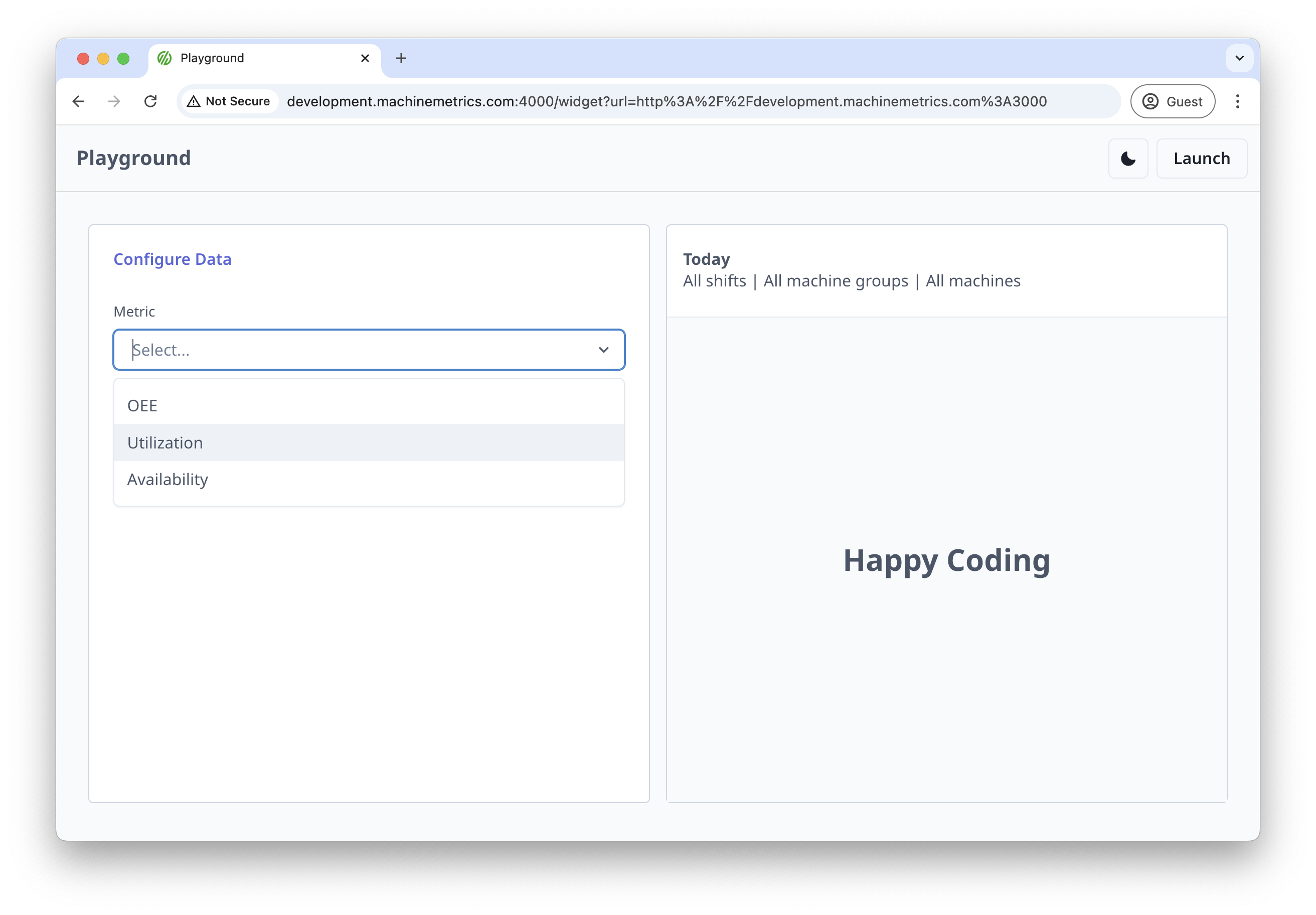
Select settings provide a dropdown menu for users to choose from predefined options. This is ideal for settings that have a fixed set of valid values.
Basic Usage
import { useMMAppSetting } from '@machinemetrics/mm-react-tools';

function MyWidget() {
  useMMAppSetting('metric', {
    label: 'Metric',
    type: 'select',
    options: [
      { label: 'OEE', value: 'oee' },
      { label: 'Utilization', value: 'utilization' },
      { label: 'Availability', value: 'availability' },
    ],
  });
}
Properties
| Property | Type | Description |
|---|---|---|
label | string | Display label for the select field |
type | "select" | Must be set to "select" |
isMulti | boolean | Whether multiple items in the dropdown can be chosen |
options | array | Array of option objects with label and value properties |
isRequired | boolean | Whether a selection is required |
helperText | string | Help text displayed below the select |
default | string | Default selected value |
validate | function | Validation function for the selected value |
Dynamic Options
You can provide options dynamically using a function:
useMMAppSetting('metric', {
  label: 'Metric',
  type: 'select',
  options: () => {
    // Fetch or compute options dynamically
    return [
      { label: 'OEE', value: 'oee' },
      { label: 'Utilization', value: 'utilization' },
    ];
  },
});
Examples
Basic Select with Default Value
useMMAppSetting('timeRange', {
  label: 'Time Range',
  type: 'select',
  default: '24h',
  options: [
    { label: 'Last Hour', value: '1h' },
    { label: 'Last 24 Hours', value: '24h' },
    { label: 'Last Week', value: '7d' },
    { label: 'Last Month', value: '30d' },
  ],
});
Select with Dynamic Options Based on Context
useMMAppSetting('machine', {
  label: 'Machine',
  type: 'select',
  isRequired: true,
  helperText: 'Select a machine to monitor',
  options: () => {
    // Example of dynamic options based on available machines
    return availableMachines.map((machine) => ({
      label: machine.name,
      value: machine.id,
    }));
  },
});
Select with Validation
useMMAppSetting('aggregation', {
  label: 'Aggregation Method',
  type: 'select',
  default: 'average',
  validate: ({ value }) => {
    if (!['average', 'sum', 'min', 'max'].includes(value)) {
      return { message: 'Invalid aggregation method' };
    }
    return null;
  },
  options: [
    { label: 'Average', value: 'average' },
    { label: 'Sum', value: 'sum' },
    { label: 'Minimum', value: 'min' },
    { label: 'Maximum', value: 'max' },
  ],
});
Select with Filterable Options
When options is a function, it receives the text the user has typed as filter. The settings form still narrows the returned options to those whose label or value contains that text, so return options whose label includes the typed text. An option matched on some other field (a serial number, say) is returned but not shown.
useMMAppSetting('metric', {
  label: 'Metric',
  type: 'select',
  options: ({ filter }) => {
    const allMetrics = [
      { label: 'OEE', value: 'oee' },
      { label: 'Utilization', value: 'utilization' },
      { label: 'Availability', value: 'availability' },
      { label: 'Performance', value: 'performance' },
      { label: 'Quality', value: 'quality' },
    ];

    // Filter options based on the provided filter string
    if (!filter) return allMetrics;

    return allMetrics.filter((metric) =>
      metric.label.toLowerCase().includes(filter.toLowerCase()),
    );
  },
});
Select with Async Options from API
import { useMMAuth } from '@machinemetrics/mm-react-tools';

function MyWidget() {
  const { request, urls } = useMMAuth();

  useMMAppSetting('machine', {
    label: 'Machine',
    type: 'select',
    options: async ({ filter }) => {
      // Fetch machines from API
      const response = await request(`${urls.apiUrl}/machines`);
      const machines = response.data;

      // Filter machines based on the provided filter string
      if (!filter) return machines;

      return machines.filter((machine) =>
        machine.name.toLowerCase().includes(filter.toLowerCase()),
      );
    },
  });
}